I get asked to compare Verso with Scrivener more than any other app. So let me do it properly, including the part where I tell you to buy the other one.
I built Verso, so take my bias as read. But this particular comparison is not close, and it is not close in both directions depending on what you write.
They Are Different Kinds of Thing
Scrivener is a project manager that happens to contain a text editor. Verso is a word processor.
That sounds like a slight. It is not. It is the whole comparison, and everything below follows from it.
In Scrivener, your novel is not a document. It is a binder full of scenes, character sheets, research clippings, PDFs, images and notes, which you eventually compile into a document at the end. In Verso, your document is a document. You open it, write in it, and save it as the same file you opened.
What Scrivener Does Better
Structure, at Scale
If you are writing something with sixty scenes and you need to move scene forty-one to chapter two, Scrivener does this in one drag. The corkboard shows every scene as an index card. The outliner shows word counts per section against targets.
Verso has a document outline sidebar that jumps between headings. That is useful. It is not the same thing, and pretending otherwise would be silly.
Keeping the Research With the Writing
Scrivener holds your reference material inside the project. Web pages, PDFs, photographs, interview notes, sitting alongside the manuscript in the same window. For anything researched, this is genuinely excellent, and Verso has no answer to it at all.
Compile
Scrivener’s compile step turns your binder into manuscript format, ebook, paperback layout, or whatever the submission guidelines demand. It is fiddly and people complain about it, but nothing else does the job.
It Runs on Windows and iPad
Scrivener is on macOS, Windows and iOS. Verso is Mac only, and will stay Mac only. If you draft on an iPad in a cafe, that decides it.
It Has Been Around Since 2007
Scrivener is nearly twenty years old, made by a small UK company, and there are books and courses about how to use it. Verso is new. Maturity counts for something, especially with a manuscript you cannot afford to lose.
What Verso Does Better
Word Files Are the Point, Not an Export Step
This is the real difference for most people.
In Scrivener, a .docx is something you compile out at the end, and something you import awkwardly at the beginning. If your editor sends back a marked-up Word file with tracked changes and comments, you are not really in Scrivener territory any more.
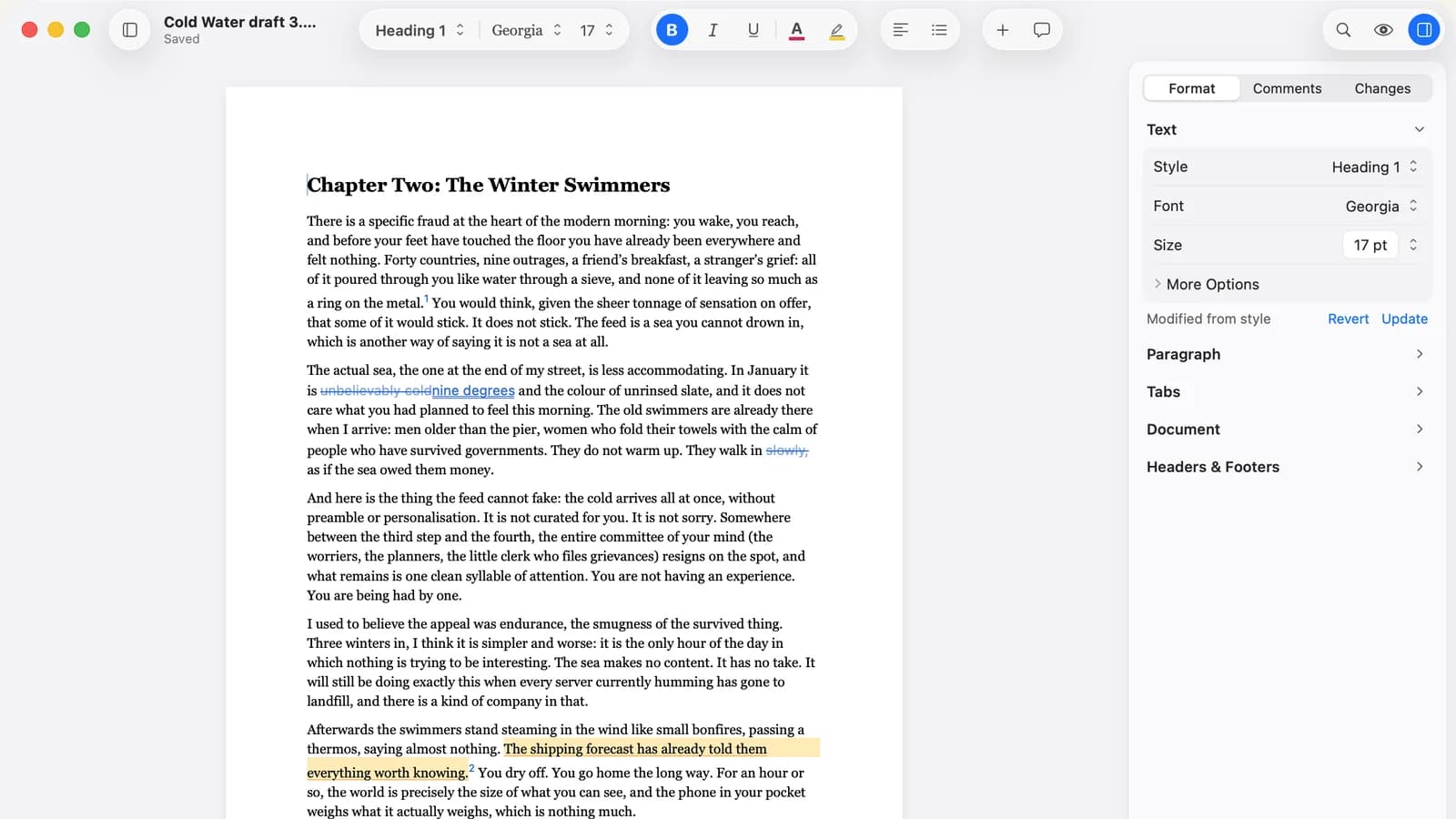
Verso opens that file directly, keeps the tracked changes and comments, lets you work, and saves it back as the same .docx. Headers, footers, footnotes, tables and styles survive the trip. That is the thing Verso is built to do.
It Opens Immediately
Verso is 18.2 MB and opens in about a second. Scrivener is a much bigger app doing a much bigger job, and it feels like it.
It Is Simpler, Which Is Sometimes the Feature
Scrivener has a learning curve. People say this kindly and they are still saying it. There are tutorials, because you need them.
Verso has a page and a cursor. If what you are writing is a report, a chapter, an article, a thesis section or a letter, the binder and the corkboard are overhead you are paying for and not using.
Price
Scrivener is $59.99, once. Verso is $14.99, once. Both are one-time purchases, which in 2026 makes them unusual allies rather than enemies. Neither of us will rent you your own writing.
Scrivener also does educational pricing at $49.99, which is worth knowing if you qualify.
How to Choose
Buy Scrivener if you are writing a book, a thesis, a screenplay, or anything where the structure is the hard part. If you have ever thought “I need to see all my scenes at once”, that is Scrivener and no amount of me talking will change it.
Buy Verso if the hard part is the words and the file. If your work arrives as .docx and leaves as .docx, if you are handed documents by other people, if you want the thing to open instantly and get out of the way, that is what Verso is for.
Plenty of people should own both, and it is not an expensive combination. Draft the shape of the book in Scrivener. Do the final pass, the editor’s comments and the submitted file in a word processor. I do not think that is a fudge. Compile-then-polish is how a lot of finished books actually happen.
The Comparison Table
| Feature | Verso | Scrivener |
|---|---|---|
| Price | $14.99 one-time | $59.99 one-time ($49.99 educational) |
| Subscription | No | No |
| Platforms | macOS 14+ | macOS, Windows, iOS |
| What a “document” is | A file you open and save | A project you compile |
| Project binder | No | Yes |
| Corkboard and outliner | Headings outline only | Yes |
| Research stored in project | No | Yes (PDFs, images, web pages) |
| Compile to manuscript or ebook | No | Yes |
| Native .docx editing | Yes (open and save the same file) | Import and compile |
| Track changes and comments | Yes | Comments and annotations, no Word-style tracked changes |
| Headers and footers | Yes | Applied at compile |
| Footnotes | Yes | Yes |
| Markdown | Yes (full round-trip) | Yes (MultiMarkdown) |
| Focus mode | Yes | Yes (Composition Mode) |
| App size | 15 MB | Substantially larger |
| Learning curve | Minimal | Real, and worth it if you need the features |
One Honest Caveat
Verso is new and Scrivener is not. If you are three years into a manuscript, the boring argument wins: stay where your work is. Do not migrate a book because a blog post told you to, least of all one written by the person selling the other app.
But if you are starting something, or you spend your days in Word files that other people send you, Verso is $14.99 on the Mac App Store, with a free trial first.
Related reading
Best Mac word processor 2026 covers the wider field. Verso vs Ulysses looks at the subscription question, and Verso vs Microsoft Word covers .docx fidelity in more depth.