Blog·October 2026
I Tried to Out-Design Apple. Apple Won.
Verso 1.0.56, and what I got wrong about windows.
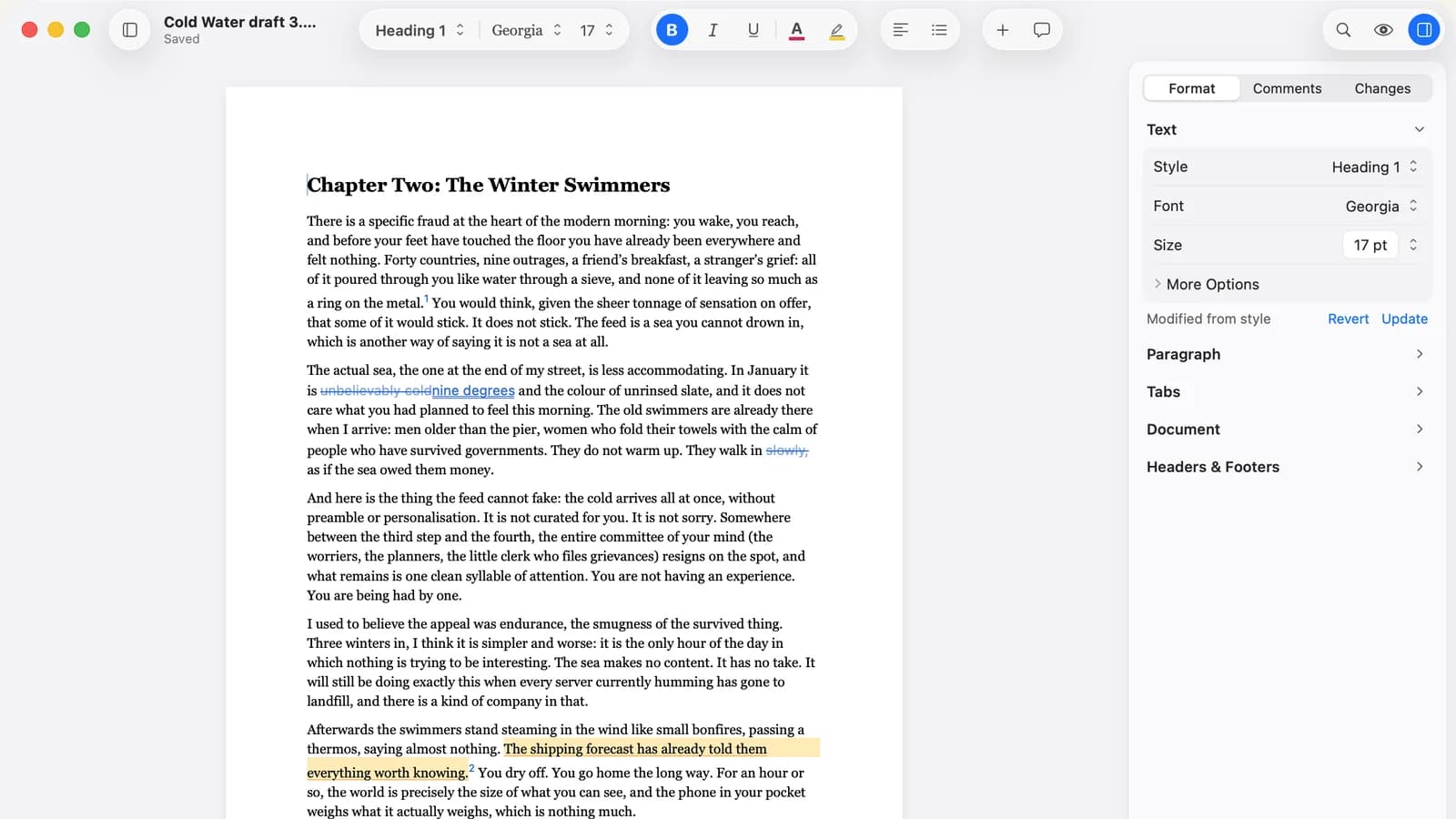
I am not a designer. What I am is worse: a solo developer with opinions and nobody to argue with.
So for the best part of a year I built Verso’s window by hand. I was quite pleased with myself. This is the story of how that stopped.
What I Built
One big frosted material behind the entire window. A slate accent colour I was quietly proud of. My own chevrons, drawn by hand. My own inspector, with a drag handle. My own settings sidebar. Section headers in small capitals, because it felt editorial.
By the end, the code carried about three hundred hard-coded font sizes. I did not count them on purpose. A tool did, and I did not enjoy the number.
And it looked fine. I want to be fair to myself here. It looked ok. It looked fine right up until you put it next to anything else on a Mac.
The Screenshot
A tester sent me a screenshot of Pages and one sentence: the sidebar in Verso merges with the editing space.
He was right, and I knew it the second I looked. I had put one material behind everything, so the canvas, the outline and the inspector were all the same tone, separated by a hairline. Pages gives every surface its own tone and lets the system decide where the glass goes. Mine was a very nice, very consistent mush.
Where I Argued With Apple For About a Day
I tried to defend my version. I really did. Then I read Apple’s Human Interface Guidelines properly, not skimming for the bit that agrees with me, and the pattern was boring and consistent. Apple had already solved almost every problem I had solved, and solved it better.
The system inspector collapses properly in narrow windows. Mine never did. The system sidebar is a sidebar. Mine was a panel painted on top of a vibrancy layer, pretending. The system accent colour is the one you chose in System Settings, which is a decision you made long before you met me.
What Went
The inspector is the system one now, with Format, Comments and Changes at the top and grouped sections underneath. The outline is a proper full-height sidebar. Citations got their own floating panel, under Review, Citations. Settings is a normal tab window, and About is the normal About panel.
The toolbar pop-ups size themselves to what is in them. The document title has an Edited or Saved line under it, like every other Mac app you own. The accent colour is yours, and the caret follows it.
Glass now appears only where the system draws it: the toolbar, the sidebar, the inspector, popovers, sheets. The page itself is solid. A page should not be see-through. I cannot believe I needed Apple to tell me that.
What Stayed
The page as a card on a calm canvas. Styles first. Focus mode. The icon. British spelling, obviously. Those are Verso. The window around them never was.
The Weird Part
It feels more mine now, not less.
Before, I was putting effort into things nobody consciously noticed, and which quietly told every new user “this is not quite a Mac app” before they had typed a word. Now the first impression is that it belongs there. What is different about Verso is what it does with a Word document, not how its scrollbar behaves.
Custom chrome is a loan against every future version of macOS. Apple has more people, more devices and more years on this than I will ever have. My job is the thing inside the window.
While I Was In There
1.0.56 has a few other things. Two Pages now pairs page 1 with page 2 instead of opening like a book. Command-Up and Command-Down jump to the start or end of the document. Headers and footers grow to fit their text and push the body down, on screen and in print, and the distance from the edge now follows Word’s 0.5 inch. Settings has Minimum header height and Minimum footer height for it.
Those came from people writing to me with real documents. That part of the process has not changed, and I hope it never does.
Related reading
What’s new in Verso lists every release and what changed in it. What happens when you report a bug explains where those documents go. And if you want the app itself, Verso is on the Mac App Store for $14.99, once.